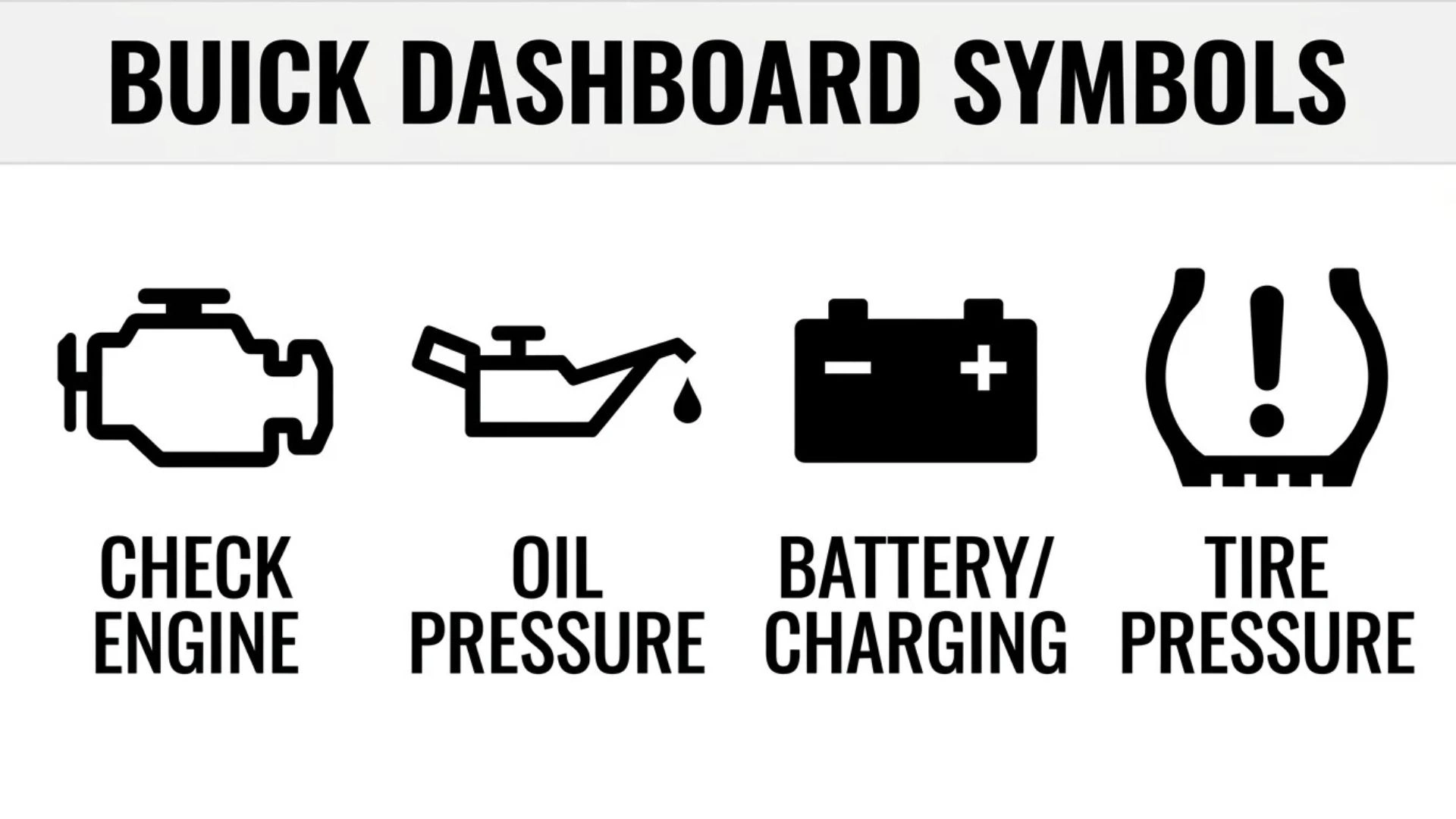
Seeing an unfamiliar light on your Buick dashboard can make any drive stressful. One moment, everything seems normal.
Then a small engine symbol, red warning light, or strange icon appears in the instrument cluster. You may wonder whether your vehicle needs immediate attention or whether the light simply indicates that a feature is working.
Understanding Buick dashboard symbols helps you make that decision. These symbols communicate information about your engine, brakes, tires, electrical system, safety features, and driving conditions. Some indicators are normal. Others warn you about problems that need attention.
This guide explains common Buick dashboard warning lights and informational icons in simple language. You’ll learn what each symbol means, why it appears, and what to do when you see it. It also covers Buick Enclave, Encore, Encore GX, Envision, and Envista dashboards, along with driver-assistance indicators and troubleshooting advice.
Important safety note: Buick dashboard symbols can vary by model, year, trim, and available equipment. The same warning may also have different instructions depending on the vehicle. Use this article as a general guide, then confirm the meaning in the owner’s manual for your exact Buick.
What Do Buick Dashboard Symbols Mean?
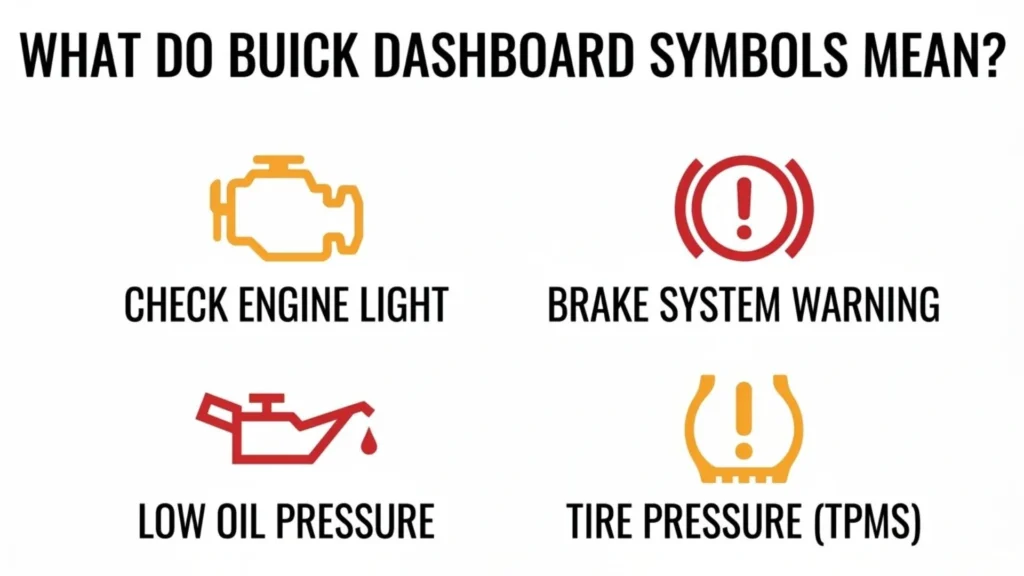
Buick dashboard symbols are visual messages displayed through your vehicle’s instrument cluster or Driver Information Center (DIC). They help you understand what your vehicle is doing and alert you when a system needs attention.
You may see a symbol when you start the engine, activate a feature, or encounter a problem. Some lights appear briefly during the startup system check. Others remain illuminated until you correct an issue or have the vehicle inspected.
For example, an oil-can symbol may warn about low engine oil pressure. A tire-shaped symbol with an exclamation mark can indicate low tire pressure. A green cruise-control indicator usually means the system is actively controlling your speed.
It helps to divide these symbols into three general groups:
- Warning lights: These alert you to a possible problem, malfunction, or unsafe condition.
- Status indicators: These show that a vehicle feature is active or selected.
- Information icons: These provide details about a system, driving mode, or vehicle condition.
Not every illuminated symbol means something is broken. A green indicator may simply confirm that a feature is operating. However, never ignore a warning just because the vehicle still drives normally.
Buick Dashboard Symbols and Meanings With Pictures
A visual symbol guide makes it easier to recognize an unfamiliar dashboard light. The descriptions below explain the common appearance and meaning of Buick’s indicators. Actual artwork, colors, and display positions may differ between vehicles.
Engine and Battery Warning Symbols
These symbols relate to the engine, lubrication, cooling, fuel, and electrical systems. Pay close attention to warnings involving oil pressure or engine temperature because continued driving can cause serious damage.
| Symbol appearance | Name | Meaning |
| Small engine outline | Check Engine Light | The engine or emissions system has detected a problem |
| Oil can with a drop | Oil Pressure Warning | Engine oil pressure may be too low |
| Thermometer over liquid | Coolant Temperature | The engine may be overheating |
| Battery with plus and minus signs | Charging System | The electrical charging system may have a fault |
| Fuel pump | Low Fuel | The remaining fuel level is low |
| A inside a circular arrow | Auto Stop/Start | The automatic engine stop/start feature is operating or enabled |
| Battery or high-voltage warning | Battery Fault | An electrified vehicle may have detected a high-voltage battery problem |
The check engine, oil pressure, and coolant temperature symbols are especially important. A flashing check engine light or a persistent oil pressure warning requires a more urgent response than a routine service reminder.
Brake and Safety Warning Symbols
Brake and safety symbols help you identify problems with systems that protect the driver and passengers.
| Symbol appearance | Name | Meaning |
| ABS inside a circle | ABS Warning | The antilock braking system may have a fault |
| Exclamation mark inside a circle | Brake System Warning | A brake-related issue or parking brake condition |
| Person with a circle in front | Airbag Readiness | The airbag system may need service |
| Person wearing a seat belt | Seat Belt Reminder | A driver or passenger needs to fasten a seat belt |
| Car with skid marks | Traction Control/StabiliTrak | The stability or traction system is active or reporting a problem |
| P inside a circle | Electric Parking Brake | The parking brake is applied or may have a fault |
Do not confuse the ABS light with the regular brake warning. They refer to different systems. If both appear together, the braking problem may be more serious.
Tire and Traction Control Symbols
Tire and traction indicators help you understand how your Buick handles the road.
| Symbol appearance | Name | Meaning |
| Flat tire outline with an exclamation mark | TPMS Warning | One or more tires may be underinflated |
| Car with wavy skid lines | Traction Control | The system is helping maintain traction or has detected a fault |
| Traction control with OFF | Traction Control Disabled | The driver may have switched off traction control |
| Steering wheel with warning mark | Power Steering | The steering-assistance system may have a problem |
A flashing TPMS light can indicate a monitoring-system fault rather than simply low tire pressure. Check the tire pressure and the owner’s manual before deciding what the warning means.
Driver Assistance and Technology Symbols
Many newer Buick models offer driver-assistance features. Their symbols can appear in the instrument cluster or on the center display.
| Symbol or appearance | Name | Meaning |
| Vehicle between lane lines | Lane Keep Assist | Lane assistance is available or active |
| Car with collision marks | Forward Collision Alert | The system has detected a possible forward collision risk |
| Vehicle ahead symbol | Vehicle Ahead Indicator | A vehicle has been detected in front |
| Pedestrian symbol | Pedestrian Ahead Indicator | A pedestrian has been detected ahead |
| Car with a star or side alert | Lane Change or Side Blind Zone Alert | A vehicle may be in a nearby blind zone |
| P with sonar waves | Park Assist | Parking sensors are detecting nearby objects |
| Triangle with directional arrows | Rear Cross Traffic Alert | Traffic may be approaching behind the vehicle |
| Speedometer with a following-distance indicator | Adaptive Cruise Control | Adaptive cruise control is available or active |
These symbols do not appear on every Buick. Their availability depends on the model, year, and installed safety equipment.
Lighting and Vehicle Status Indicators
These icons usually show that a feature is active or that the vehicle is in a particular operating condition.
| Symbol appearance | Name | Meaning |
| Headlight with straight beams | High Beam Indicator | High-beam headlights are on |
| Headlight with a wavy line | Front Fog Light | Front fog lamps are active |
| Green turn arrow | Turn Signal | The corresponding turn signal is operating |
| Speedometer with an arrow | Cruise Control | Cruise control is on or controlling speed |
| Vehicle with an open door | Door Ajar | A door or liftgate is not fully closed |
| Key or lock symbol | Security Indicator | The theft-deterrent system is active or reporting an issue |
| Vehicle with READY | Vehicle Ready | The vehicle is ready to drive, where equipped |
| Drive-mode icon | Driver Mode | A selected driving mode is active |
A normal status indicator usually does not require repairs. Still, make sure the feature is appropriate for your driving conditions. For example, switch off high beams when approaching another vehicle.
Buick Dashboard Warning Lights by Color
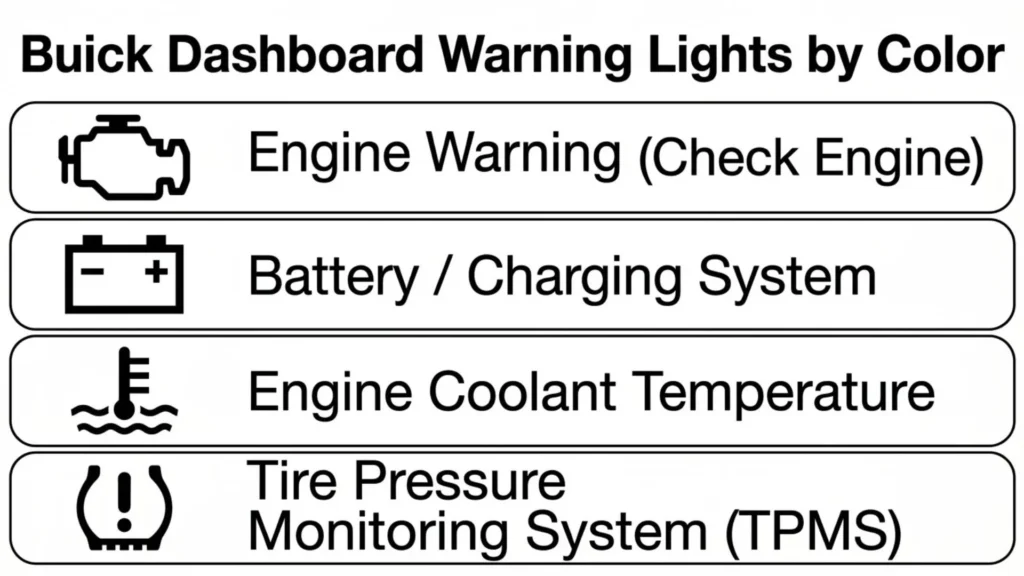
Dashboard light colors provide a useful first clue about urgency. However, color alone cannot tell you exactly what has happened. You must also identify the symbol and read any message on the display.
Red Buick Dashboard Warning Lights
Red warning lights often indicate a serious condition or an important safety reminder. Some require you to stop driving as soon as it is safe.
Common examples include:
- Engine oil pressure warning
- Engine coolant temperature warning
- Brake system warning
- Certain airbag or restraint-system warnings
- Some serious electrical or propulsion-system warnings
If the oil pressure or overheating warning appears while driving, pull over safely and follow the vehicle’s instructions. Continuing to drive may cause severe damage.
A red seat belt reminder is different. It usually means someone needs to buckle up. The symbol’s meaning matters more than its color alone.
Yellow and Amber Buick Dashboard Warning Lights
Yellow or amber indicators usually mean that a system needs attention, a feature is unavailable, or the vehicle has detected a possible problem.
Common examples include:
- Check engine light
- ABS warning
- Tire pressure warning
- Traction control warning
- Some driver-assistance alerts
- Certain service or maintenance indicators
An amber light does not always mean you must stop immediately. For example, an amber Forward Collision Alert may simply warn that you are following another vehicle too closely.
However, an amber warning that stays on may require diagnosis. Read the display message and check the owner’s manual for the correct action.
Green, Blue, and White Buick Dashboard Indicators
Green, blue, and white lights often communicate normal vehicle operation.
Green indicators commonly show that a feature is active or ready. Cruise control and some lane-assistance indicators use green when their functions are available or operating.
Blue indicators commonly show that high-beam headlights are switched on. Some vehicles may use blue for other specific status information.
White indicators often show that a system is switched on but not actively controlling the vehicle. For example, a white cruise-control icon may mean the feature is available but no speed has been set.
These colors are general guides, not universal rules. Check the exact symbol and its accompanying message.
Common Buick Dashboard Warning Lights and Their Meanings
The following sections explain the warning lights Buick drivers commonly encounter. Each description includes the likely meaning and a practical next step.
Buick Check Engine Light
<text>Symbol appearance: A small outline of an engine.</text>
The check engine light, also called the malfunction indicator lamp, means the vehicle has detected a possible engine or emissions-system problem.
Possible causes include:
- A loose or damaged fuel cap on applicable models
- A faulty oxygen sensor
- An ignition or spark plug problem
- A fuel-system issue
- An air intake or emissions-system fault
- An engine misfire
What should you do?
If the light stays on steadily and the vehicle runs normally, arrange a diagnostic check as soon as practical. Avoid ignoring it for weeks because a small issue can become more expensive if left unresolved.
If the light flashes, take it more seriously. A flashing check engine light can indicate an active misfire that may damage the catalytic converter. Reduce engine load, avoid hard acceleration, and stop safely if the light continues flashing or the vehicle runs roughly.
A diagnostic scan can identify stored trouble codes. However, a code does not automatically prove that one particular part has failed. A technician may need to test the system before recommending a repair.
Buick Engine Oil Pressure Warning Light
<text>Symbol appearance: An oil can with a dripping drop.</text>
The oil pressure warning light indicates that engine oil pressure may be too low. Your engine needs proper oil pressure to keep moving parts lubricated.
Possible causes include low oil level, an oil leak, a faulty pressure sensor, or an internal lubrication problem.
What should you do?
- Pull over as soon as it is safe.
- Switch off the engine.
- Check the oil level using the procedure in your owner’s manual.
- Add the recommended oil if the level is below the specified range.
- Restart only as directed by the vehicle’s instructions.
If the warning remains after restarting, switch the engine off again. Do not keep driving with a persistent oil pressure warning.
Remember that low oil pressure and low oil level are not exactly the same thing. Adding oil may not solve a mechanical pressure problem.
Buick Engine Coolant Temperature Warning Light
<text>Symbol appearance: A thermometer above wavy liquid.</text>
This warning indicates that the engine temperature may be too high. It can appear when the cooling system cannot keep the engine within its normal operating range.
Possible causes include:
- Low coolant
- A coolant leak
- A damaged radiator
- A faulty thermostat
- A cooling fan problem
- A water pump issue
What should you do?
Pull over safely and turn off the engine. Allow it to cool before checking anything under the hood.
Never remove a hot radiator cap or coolant reservoir cap. Hot coolant can escape under pressure and cause serious burns.
If the warning remains, coolant is leaking, or the engine has overheated, arrange professional assistance. Driving with an overheating engine can cause expensive internal damage.
Buick Battery and Charging System Warning Light
<text>Symbol appearance: A battery with plus and minus signs.</text>
The charging system warning light can indicate a problem with the vehicle’s electrical system. The alternator, wiring, battery connections, or related components may need inspection.
When the charging system does not work correctly, the vehicle may rely on the remaining battery charge. Electrical systems can eventually stop working if the battery becomes depleted.
What should you do?
Arrange service promptly. If the warning appears while driving, reduce unnecessary electrical use and find a safe place to stop if the vehicle begins losing power or showing other electrical problems.
Do not assume the battery itself is defective. A charging-system test can help identify the actual cause.
Buick Brake System Warning Light
<text>Symbol appearance: The word BRAKE or an exclamation mark inside a circle.</text>
The brake system warning light may appear when the parking brake is applied, brake fluid is low, or the braking system has detected a problem.
What should you do?
First, check whether the parking brake is fully released. If the warning remains, stop safely and inspect the situation according to the owner’s manual.
Pay attention to changes in brake-pedal feel. A soft pedal, unusual resistance, or reduced braking response can indicate a serious problem.
Do not continue driving if the brakes feel abnormal or the warning indicates a braking-system fault. Arrange professional assistance.
Buick ABS Warning Light
<text>Symbol appearance: The letters ABS inside a circle.</text>
ABS stands for Antilock Braking System. It helps prevent the wheels from locking during hard braking, which can help you maintain steering control.
If the ABS light stays on, the system may not be available.
There is an important difference between an ABS-only warning and an ABS warning that appears with the regular brake warning.
- ABS light only: The normal braking system may still work, but antilock assistance may be unavailable.
- ABS and brake warning together: The regular braking system may also have a problem.
What should you do?
If the ABS light alone appears and the brakes feel normal, drive cautiously only as permitted by your owner’s manual and arrange service. If the red brake warning appears too, or braking feels abnormal, stop safely and seek assistance.
Buick Tire Pressure Monitoring System (TPMS) Light
<text>Symbol appearance: A flat tire outline with an exclamation mark.</text>
The TPMS warning light indicates that one or more tires may be significantly underinflated. Low pressure can affect handling, braking, tire life, and fuel economy.
Common causes include:
- A puncture
- A slow air leak
- Cold weather
- Natural pressure loss
- A faulty tire pressure sensor
What should you do?
Check all four tires when they are cold. Use a reliable pressure gauge and compare the readings with the recommended pressure on the driver’s door-jamb label.
Inflate each tire to the vehicle’s specified pressure. Do not use the maximum pressure printed on the tire sidewall as your normal target.
A flashing TPMS light that continues flashing after startup may indicate a problem with the monitoring system. Check the owner’s manual and arrange service if necessary.
Buick Airbag Warning Light
<text>Symbol appearance: A seated person with a circle in front.</text>
The airbag readiness light indicates the condition of the Supplemental Inflatable Restraint system.
It normally illuminates briefly during startup. If it stays on, the airbag system may have a fault. An airbag or seat-belt pretensioner might not operate as intended during a collision.
What should you do?
Arrange immediate service through a qualified technician or Buick dealer. Do not attempt to repair airbag wiring or connectors yourself. These components require proper handling.
If your vehicle displays a separate passenger airbag ON or OFF indicator, understand that it communicates passenger-airbag status rather than necessarily indicating a fault.
Buick Seat Belt Warning Light
<text>Symbol appearance: A person wearing a seat belt.</text>
The seat belt reminder appears when the driver or a passenger has not fastened a seat belt. Depending on the Buick model, separate indicators may monitor the front and rear seats.
The warning may flash or sound an alert until the seat belt is fastened.
What should you do?
Fasten your seat belt before driving. Make sure every passenger is properly secured as well.
If the warning remains after everyone has buckled up, check the owner’s manual. A seat sensor or buckle switch may need inspection.
Buick Traction Control and StabiliTrak Light
<text>Symbol appearance: A vehicle with wavy skid marks underneath.</text>
This symbol relates to traction control and electronic stability control. These systems help the vehicle maintain grip and stability when wheels begin to slip.
A flashing indicator often means the system is actively working. For example, it may flash when you accelerate on a slippery road.
A light that stays on can indicate that traction control or StabiliTrak has been switched off or has detected a problem.
What should you do?
If the symbol flashes briefly on a slippery surface, reduce speed and avoid sudden steering or acceleration.
If it stays illuminated, check whether you accidentally switched off the system. If you did not, arrange an inspection. Do not assume the stability system will protect you when its warning remains active.
Buick Door Ajar Warning Light
<text>Symbol appearance: A vehicle viewed from above with an open door.</text>
The door ajar warning means a door is not fully closed. Depending on your Buick, the display may identify which door is open.
The same warning may appear when the liftgate or rear hatch is not properly latched.
What should you do?
Stop safely and check all doors. Close the liftgate if necessary. Before moving again, confirm that the warning has disappeared and every door is secure.
Buick Low Fuel Warning Light
<text>Symbol appearance: A fuel pump.</text>
The low fuel light appears when the remaining fuel reaches a low level. The exact amount of fuel remaining depends on your Buick model and fuel system.
What should you do?
Refuel as soon as practical. Do not depend entirely on the estimated driving range because traffic, speed, road conditions, and driving habits can change fuel consumption.
If the warning remains after refueling, the fuel-level sensor or related system may need inspection.
Buick Security or Anti-Theft Light
<text>Symbol appearance: A key, lock, or vehicle-related security icon.</text>
The security indicator relates to the vehicle’s theft-deterrent or immobilizer system.
A flashing light when the vehicle is parked may be normal. It can show that the theft-deterrent system is active.
If the light stays on and the engine will not start, the vehicle may not recognize the key or may have detected a security-system fault.
What should you do?
Follow the key and remote troubleshooting steps in your owner’s manual. If the engine still will not start, arrange service.
Buick Electric Parking Brake Warning Light
<text>Symbol appearance: A letter P inside a circle or a parking-brake icon.</text>
This indicator shows the status of the electric parking brake on equipped models.
When the brake is applied, the symbol may illuminate normally. If it remains on after you release the parking brake or begins flashing, the system may have a fault.
What should you do?
Check the parking-brake status in the Driver Information Center. Follow the manual’s release procedure. If the warning does not clear, have the system inspected.
Before leaving the vehicle, make sure it is securely parked. Do not assume the parking brake has released simply because you pressed its switch.
Buick Cruise Control Indicator
<text>Symbol appearance: A speedometer with an arrow.</text>
The cruise control indicator tells you whether the system is available or actively controlling vehicle speed.
On many Buick models:
- A white indicator means cruise control is switched on but no speed has been selected.
- A green indicator means cruise control is actively maintaining the selected speed.
What should you do?
No repair is needed when the indicator matches your selected setting. Use the steering-wheel controls to cancel cruise control when you no longer need it.
Buick High Beam Indicator
<text>Symbol appearance: A headlight with straight horizontal beams.</text>
The blue high-beam indicator appears when the high-beam headlights are on.
High beams improve visibility on dark roads, but they can temporarily blind other drivers.
What should you do?
Switch to low beams when approaching oncoming traffic or following another vehicle closely. If your Buick has IntelliBeam, check the owner’s manual to understand how automatic high-beam operation works.
Buick Fog Light Indicator
<text>Symbol appearance: A headlight with a wavy line through its beams.</text>
This symbol indicates that the front fog lamps are active on equipped models.
Fog lights are designed to help in certain low-visibility conditions. They do not replace normal headlights.
What should you do?
Use fog lights when weather or road conditions make them useful. Switch them off when visibility improves and follow local lighting rules.
Buick Driver Assistance Symbols and Their Meanings
Modern Buick vehicles may display icons for collision alerts, lane assistance, parking support, and other driver-assistance technologies.
These indicators are not all mechanical warning lights. Some show that a feature is available. Others alert you to a possible hazard or tell you that a safety feature is unavailable.
Lane Keep Assist (LKA) Symbol
<text>Symbol appearance: A vehicle between two lane lines or two marked road lines.</text>
Lane Keep Assist uses a forward-facing camera to detect lane markings and provide a brief steering nudge when the vehicle may unintentionally drift out of its lane.
The icon can communicate different operating conditions:
- White: The feature may be switched on but is not currently ready to assist.
- Green: The system is available to provide assistance.
- Amber: The system may detect an unintended lane departure.
Poor visibility, faded road markings, or certain driving conditions can prevent the camera from detecting lane lines.
What should you do?
Keep your hands on the steering wheel and remain responsible for steering. Lane Keep Assist is designed to support the driver, not replace attention or control.
Lane Departure Warning (LDW) Symbol
<text>Symbol appearance: A vehicle or lane-marking icon showing a lane departure.</text>
Lane Departure Warning alerts you when the vehicle appears to cross a detected lane marking unintentionally.
Depending on the system, the warning may flash, sound a chime, or activate a seat vibration.
What should you do?
Check your position and steer safely back into your lane when necessary. Use your turn signal before changing lanes.
A warning may not appear when the system detects an intentional lane change. Always check the exact operation of your vehicle’s feature in the manual.
Forward Collision Alert Symbol
<text>Symbol appearance: A vehicle with collision marks or a warning shape in front.</text>
Forward Collision Alert monitors the area ahead and can warn you when the distance to another vehicle becomes unsafe.
Some Buick models use different colors to communicate the status of the detected vehicle or the level of concern.
What should you do?
Increase your following distance and pay attention to traffic. Brake when necessary and never rely on the alert to stop the vehicle for you.
Forward Collision Alert is a driver-assistance feature. It does not guarantee that every collision will be detected or prevented.
Automatic Emergency Braking Disabled Symbol
<text>Symbol appearance: A collision or braking-related icon with an OFF or disabled indication.</text>
This indicator can appear when Automatic Emergency Braking or a related braking feature has been switched off or is unavailable.
A system may become unavailable because of a malfunction, poor weather, or a blocked camera or sensor.
What should you do?
Check the vehicle settings and read the message on the display. If you intentionally selected an alert-only or off setting, restore the preferred braking setting when appropriate.
If the feature remains unavailable or a fault message appears, arrange an inspection. Do not assume automatic braking will operate while its disabled warning is displayed.
Adaptive Cruise Control (ACC) Symbol
<text>Symbol appearance: A speedometer with a vehicle or following-distance indicator.</text>
Adaptive Cruise Control can maintain a selected speed and, when equipped, adjust the distance from a vehicle ahead.
Its indicator commonly uses different colors to show whether the system is ready or actively controlling speed.
- White: The feature is switched on but no speed has been set.
- Green: The system is actively controlling speed and following distance.
What should you do?
Check your selected speed and following-distance setting. Stay attentive and be ready to brake or steer.
Adaptive Cruise Control does not make the vehicle self-driving. You remain responsible for controlling the vehicle.
Pedestrian Ahead Indicator
<text>Symbol appearance: A person or pedestrian icon in front of a vehicle.</text>
This alert can appear when an equipped Buick detects a pedestrian ahead. Some vehicles include Front Pedestrian Braking or Front Pedestrian and Bicyclist Braking.
The system may provide an amber warning when it detects a pedestrian in the vehicle’s path.
What should you do?
Slow down and watch the road carefully. Brake when necessary and give pedestrians enough space to cross safely.
Never assume the system will detect every pedestrian or stop the vehicle in every situation.
Rear Cross Traffic Alert Symbol
<text>Symbol appearance: A warning triangle or directional arrows on the rear camera display.</text>
Rear Cross Traffic Alert helps detect vehicles approaching from either side when you reverse.
The display may show arrows indicating the direction of approaching traffic.
What should you do?
Stop or delay reversing when a vehicle is approaching. Check mirrors, the rear camera, and your surroundings before moving.
The alert is an additional aid. It does not replace looking around the vehicle.
Side Blind Zone Alert Symbol
<text>Symbol appearance: A small vehicle or warning icon near the side of a vehicle.</text>
Side Blind Zone Alert helps identify vehicles traveling in areas that may be difficult to see through your mirrors.
Depending on the Buick, the warning may appear in a side mirror or another display area.
What should you do?
Check the warning before changing lanes. Look over your shoulder and use your mirrors. Never change lanes based only on the absence of a blind-zone warning.
Park Assist Symbol
<text>Symbol appearance: A letter P with curved sonar waves.</text>
Park Assist uses sensors to help detect objects near the vehicle during certain parking maneuvers.
The system may display distance information or provide audible alerts as the vehicle approaches an obstacle.
What should you do?
Slow down and check the area around your Buick. If the system reports that it is unavailable, inspect the sensors for dirt, snow, or other obstructions when safe.
Always look around the vehicle. Parking sensors may not detect every object.
Buick Vehicle Feature and Driving Mode Symbols
Some Buick dashboard icons show the selected drivetrain or driving mode. They do not necessarily indicate a fault.
Four-Wheel Drive and All-Wheel Drive Indicators
<text>Symbol appearance: A vehicle or drivetrain diagram with 2WD, 4WD, or AWD markings.</text>
On equipped models, this indicator shows which drivetrain mode is selected or operating.
Some vehicles allow the driver to select a mode. Others automatically adjust power delivery based on driving conditions.
What should you do?
Check the display to confirm the selected mode. If you see an unexpected drivetrain warning or a message indicating a system fault, consult the owner’s manual and arrange service when necessary.
Not every Buick has four-wheel drive or all-wheel drive.
Auto Stop/Start Indicator
<text>Symbol appearance: The letter A inside a circular arrow.</text>
The Auto Stop/Start system can switch off the engine when the vehicle comes to a complete stop under suitable conditions. It restarts the engine when you are ready to move.
The indicator may show that the system is enabled or operating.
What should you do?
Usually, no action is needed when the feature is working normally. If the display reports a fault or the system behaves unexpectedly, check the owner’s manual.
Driver Mode Control Symbols
Some Buick models provide different driving modes. Depending on the vehicle, these may include Normal, Sport, Snow, Terrain, Off-Road, Tow/Haul, or a customizable mode.
Each mode can have its own dashboard indicator.
What should you do?
Check the displayed mode and make sure it suits your road conditions. For example, a snow or terrain mode may change how the vehicle responds to acceleration or traction demands.
Only use modes that your Buick actually offers. Their availability depends on the model and equipment.
Vehicle Ready Indicator
<text>Symbol appearance: READY displayed on the instrument cluster.</text>
On certain electrified vehicles, a READY indicator means the vehicle is switched on and ready to move.
The vehicle may be quiet even though it is ready to drive. This can confuse drivers who expect to hear a conventional engine running.
What should you do?
Check the gear position and surroundings before moving. Do not assume the vehicle is off just because you cannot hear an engine.
Propulsion Power Limited Indicator
<text>Symbol appearance: A power or propulsion warning message on the display.</text>
On some electric or electrified vehicles, a propulsion-power warning means the vehicle has limited its available power.
Acceleration or maximum speed may be reduced because the system has detected a condition that affects propulsion.
What should you do?
Read the displayed message and drive cautiously if the vehicle remains controllable. Arrange dealer service if the warning stays on or the vehicle’s performance changes.
Follow any instruction telling you to stop or switch off the vehicle.
Which Buick Dashboard Warning Lights Mean Stop Driving?
Some dashboard warnings need immediate attention because continuing to drive can damage the vehicle or create a safety risk.
The following guide provides a general overview. Always follow the exact message and instructions for your model.
| Warning light | General urgency | Recommended action |
| Oil pressure warning | Immediate | Pull over safely and switch off the engine |
| Engine overheating | Immediate | Stop safely, switch off the engine, and let it cool |
| Brake system warning with abnormal braking | Immediate | Stop safely and arrange assistance |
| ABS and brake warnings together | Serious | Stop safely and seek professional help |
| Flashing check engine light | Urgent | Reduce engine load and stop safely if it persists or the engine runs roughly |
| High-voltage battery fault | Immediate service | Follow the display instructions and contact a Buick dealer |
| Airbag readiness warning | Prompt service | Arrange inspection because the restraint system may not work correctly |
| Steady tire pressure warning | Check promptly | Check tire pressure and inspect for damage |
| ABS-only warning | Service needed | Drive cautiously only if normal braking remains and the manual permits it |
When You Should Stop Immediately
Stop in a safe location when you see an oil pressure or engine overheating warning. Do the same if the brake pedal feels abnormal or the vehicle loses braking ability.
Do not continue driving simply because the warning disappears after a short time. A serious fault can return without warning.
When Cautious Driving May Be Possible
Some warnings allow you to move the vehicle a short distance to a safe location or service center. Examples may include an ABS-only warning when regular braking remains normal or a steady check engine light when the vehicle runs normally.
However, the owner’s manual and the vehicle’s behavior should guide that decision. If you are unsure, contact roadside assistance rather than taking a risk.
What Does a Flashing Dashboard Light Mean on a Buick?
A flashing dashboard light can have a different meaning from a steady light. The system may be actively warning you, responding to a driving condition, or reporting a fault.
Flashing Check Engine Light
A flashing check engine light can indicate an engine misfire. Continued driving under heavy engine load may damage the catalytic converter.
Reduce acceleration and stop safely if the flashing continues or the engine shakes, loses power, or runs roughly. Arrange a diagnostic check.
Flashing Tire Pressure Light
If the tire pressure light flashes when the vehicle starts and then stays illuminated, the TPMS may have a system fault.
Check tire pressures manually. If the tires are correctly inflated but the light continues flashing, arrange an inspection of the monitoring system.
Flashing Traction Control Light
A flashing traction-control symbol often means the system is actively helping the vehicle maintain grip.
You may see it when accelerating on a slippery road or driving over loose surfaces. Reduce speed and avoid sudden movements.
If the light flashes continuously or remains on after the driving condition changes, check the owner’s manual for further instructions.
Flashing Lane Departure Indicator
A flashing lane departure symbol may warn that the vehicle has crossed a detected lane marking unintentionally.
Keep your attention on the road and correct your position safely. Use your turn signal when changing lanes.
Flashing Security Light
A flashing security indicator while the vehicle is parked may be normal. It can show that the theft-deterrent system is active.
If the light stays on and the engine will not start, follow the key and security-system troubleshooting instructions in the owner’s manual.
Buick Dashboard Symbols by Model and Year
Buick does not use one identical dashboard across every vehicle. Instrument clusters, displays, safety features, and warning messages change between models and model years.
A symbol found on a newer Envision may not appear on an older Enclave. Likewise, a vehicle with adaptive cruise control may display indicators that a lower trim without that feature does not have.
Buick Enclave Dashboard Symbols
The Buick Enclave is a midsize SUV with a range of vehicle and safety-system indicators.
Depending on its model year and equipment, the dashboard may display:
- Check engine and oil pressure warnings
- Coolant temperature and charging system indicators
- Tire pressure and brake warnings
- ABS and StabiliTrak indicators
- Lane assistance and collision alerts
- Parking assistance indicators
- Drivetrain or AWD status icons on equipped versions
For an unfamiliar symbol, check the Enclave owner’s manual for the correct model year. Do not assume that every Enclave generation uses the same display or feature set.
Buick Encore Dashboard Symbols
Older Buick Encore models use dashboard indicators for common engine, brake, tire, electrical, and safety systems.
Depending on the year and trim, you may see:
- Check engine light
- Oil pressure warning
- Battery and charging system light
- ABS and brake warnings
- Tire pressure monitoring light
- Airbag readiness indicator
- Traction control and StabiliTrak icons
- Cruise control and lighting indicators
Some older versions have a more traditional instrument cluster than newer Buick models. Their warning-light layout may look different even when the symbol has the same basic meaning.
Buick Encore GX Dashboard Symbols
The Encore GX can include additional safety and driver-assistance indicators, depending on the equipment fitted to the vehicle.
These may include:
- Forward Collision Alert
- Lane Keep Assist
- Lane Departure Warning
- Side Blind Zone Alert
- Rear Cross Traffic Alert
- Pedestrian Ahead Indicator
- Park Assist
- Tire pressure and traction control warnings
The 2026 Encore GX owner’s manual includes a vehicle symbol chart covering several of these systems. Use the manual for the exact year rather than applying the same descriptions to every Encore GX.
Buick Envision Dashboard Symbols
The Buick Envision may display a combination of mechanical warnings and driver-assistance indicators.
Depending on the model year and equipment, you may encounter:
- Engine and battery warnings
- Brake and ABS indicators
- Tire pressure monitoring
- Lane assistance symbols
- Forward collision alerts
- Adaptive cruise control indicators
- Parking and blind-zone alerts
- Drive-mode status icons
If a safety feature displays an amber or unavailable message, check whether the system is switched off, temporarily unavailable, or reporting a fault. These conditions require different responses.
Buick Envista Dashboard Symbols
The Buick Envista uses a modern instrument display that communicates vehicle status and available safety features.
Its symbols may include:
- Check engine and oil pressure warnings
- Coolant temperature and charging indicators
- Tire pressure and brake warnings
- Airbag and seat belt reminders
- Traction control and StabiliTrak
- Lane Keep Assist
- Forward Collision Alert
- Pedestrian Ahead Indicator
- Rear Cross Traffic Alert
- Side Blind Zone Alert
- Park Assist and cruise control indicators
The 2026 Envista owner’s manual includes a vehicle symbol chart that identifies many of these systems. However, not every symbol is installed or available on every trim.
Why Are Multiple Warning Lights Coming On in My Buick?
Seeing several warning lights at once can be confusing. You might notice the ABS, traction control, battery, or check engine lights appearing together.
Multiple warnings do not always mean that several separate components have failed. Sometimes one underlying problem affects multiple systems.
Weak Battery or Electrical Problems
A weak 12-volt battery, charging-system problem, loose connection, or damaged wiring can affect several electronic systems.
If multiple lights appear during startup or the vehicle struggles to start, have the battery and charging system tested.
Sensor or Wiring Faults
Modern Buick vehicles rely on sensors to monitor wheel speed, engine operation, steering, and safety systems.
A faulty sensor or damaged connection can cause more than one warning to appear. A diagnostic scan can help identify which system reported the problem.
ABS or Wheel Speed Sensor Problems
Wheel speed information helps the ABS and stability-control systems operate.
If a wheel speed sensor or related wiring develops a fault, the vehicle may display multiple warnings. The exact combination depends on the model.
Low Tire Pressure or Tire Damage
A tire with low pressure can trigger the TPMS warning. If the tire is damaged or losing air quickly, the vehicle may also become harder to control.
Inspect the tire and check its pressure. Do not continue driving on a visibly damaged or severely underinflated tire.
Communication or Control Module Issues
Vehicle systems share information through electronic control modules. A communication fault can cause several warnings to appear together.
Do not replace multiple parts based on the dashboard lights alone. Have the vehicle scanned and tested by a qualified technician.
What Should You Do When Several Lights Appear?
First, check whether any warning requires you to stop immediately. If the engine overheats, oil pressure drops, or braking becomes abnormal, stop safely.
If the vehicle appears to operate normally, read the Driver Information Center messages and arrange a diagnostic check. Write down which lights appeared and whether they flashed or stayed on.
That information can help a technician understand the problem.
How to Reset Buick Dashboard Warning Lights
Many drivers want to know how to turn off a warning light after seeing it on the dashboard. The important point is that a warning should be cleared by correcting its cause, not simply hiding the indicator.
Check the Cause Before Resetting a Warning
Start by identifying the symbol and reading the display message. Check simple issues only when it is safe and appropriate.
For example, you can check tire pressure with a gauge or confirm that a door is fully closed. However, an oil pressure, overheating, airbag, or brake warning may require professional diagnosis.
Restart the Vehicle When Appropriate
Some temporary indicators may disappear after the vehicle is switched off and restarted. Buick’s general warning-light guidance recommends turning off a gasoline-powered vehicle for two minutes before restarting when troubleshooting certain warning lights.
This does not mean every warning is safe to reset. Never use a restart as a substitute for addressing a serious oil pressure, brake, overheating, or battery fault.
Use the Correct TPMS Procedure
Some Buick models require a tire pressure monitoring system relearn or calibration procedure after tire replacement or sensor service.
The steps vary by vehicle. Check the owner’s manual for the correct procedure rather than using a generic reset method.
Get Persistent Warnings Diagnosed
If a warning remains after the underlying issue has been corrected, a technician may need to inspect the system or use diagnostic equipment.
Do not disconnect the battery or clear fault codes just to make a warning disappear. Doing so may erase useful diagnostic information without fixing the problem.
How to Find the Correct Buick Dashboard Symbols PDF
A model-specific owner’s manual is the best source for identifying an unfamiliar Buick dashboard symbol.
Follow these steps to find the correct guide:
- Identify your Buick model.
- Confirm the model year.
- Visit the official Buick Owner Center.
- Select the correct vehicle or enter the requested vehicle information.
- Open the owner’s manual.
- Look for the sections titled Instrument Cluster, Warning Lights, Indicators, or Driver Information Center.
The manual may include a vehicle symbol chart, descriptions of warning lights, and instructions for responding to dashboard messages.
You can also visit Buick’s official Warning Lights and Dashboard Symbols guide for general explanations.
For model-specific manuals, use the Buick Owner Center.
A general Buick dashboard symbols PDF may be useful for quick reference, but it cannot replace the manual for your exact model and year.
How to Read Buick Dashboard Messages
A dashboard symbol may appear alongside a written message in the Driver Information Center. That message often provides more useful detail than the icon alone.
For example, your display may tell you that tire pressure is low, a driver-assistance feature is unavailable, or a vehicle system needs service.
Check the Full Message
Read the complete message when you have stopped safely. Do not rely on a partial message or a symbol alone.
Some messages include an instruction such as checking a system, reducing speed, or stopping the vehicle.
Look for Additional Warning Lights
A single symbol may mean something different when another warning appears at the same time.
For example, an ABS warning by itself is not the same as an ABS warning accompanied by the regular brake system warning.
Check Whether the Message Returns
If a warning disappears after restarting but comes back during the next drive, the underlying issue may still exist.
Record the message and the conditions in which it appears. Share those details with the service technician.
Frequently Asked Questions About Buick Dashboard Symbols
What do all the symbols on a Buick dashboard mean?
Buick dashboard symbols communicate information about the engine, brakes, tires, battery, safety features, and vehicle settings. Some are warning lights, while others show that a feature is active. Their exact meanings depend on the Buick model, year, and equipment.
What is the most serious warning light on a Buick dashboard?
The engine oil pressure, engine overheating, and serious brake system warnings can indicate immediate risks. Stop safely when these appear and follow the owner’s manual. Continuing to drive with these problems may cause severe damage or create a safety hazard.
What does a yellow light mean on a Buick dashboard?
A yellow or amber light generally indicates a problem, warning, or feature that needs attention. Examples include the check engine, ABS, and tire pressure lights. However, some amber driver-assistance icons are alerts rather than mechanical faults.
Can I drive my Buick with the check engine light on?
A steady check engine light may allow you to drive cautiously for a short time if the vehicle runs normally, but you should arrange a diagnostic check promptly. A flashing light can indicate a serious misfire. Reduce engine load and stop safely if it continues flashing or the engine runs roughly.
What does the car with skid marks symbol mean on a Buick?
The car with skid marks usually relates to traction control or StabiliTrak. A flashing light often means the system is actively helping maintain traction. A light that stays on may mean the system is switched off or has detected a fault.
Why does my Buick tire pressure light stay on after filling the tires?
The tire pressure monitoring system may need time to update. One tire may also remain underinflated, or the system may have a sensor fault. Check all tires when cold and compare their pressure with the driver’s door-jamb label.
Why do multiple warning lights come on in my Buick?
Multiple lights can appear because of a weak battery, charging-system fault, sensor problem, wiring issue, or communication fault between vehicle systems. Check for serious warnings first, then arrange a diagnostic scan to identify the underlying cause.
What does a flashing dashboard light mean on a Buick?
A flashing light can indicate an active warning or a system responding to driving conditions. A flashing check engine light can signal a serious misfire, while a flashing traction-control light often means the system is working. Identify the exact symbol before deciding what to do.
How do I reset Buick dashboard warning lights?
The correct method depends on the warning and the model. Some indicators disappear after a condition is corrected or the vehicle completes a restart. Others require diagnosis or a specific relearn procedure. Never clear a serious warning without fixing the underlying issue.
Where can I download a Buick dashboard symbols PDF?
You can find the correct owner’s manual through the official Buick Owner Center. Select your model and year, then open the instrument-cluster or warning-light section. The manual is more reliable than a generic symbol chart.
Are Buick dashboard symbols the same across all models?
No. Symbols and their display styles can vary by model, year, trim, and available equipment. Common warnings may look similar, but newer vehicles can include additional driver-assistance, drivetrain, and electrified-vehicle indicators.
Why does my Buick show a warning light but drive normally?
Some problems do not immediately affect how the vehicle feels. A sensor or emissions fault, for example, may activate a warning before you notice a change in performance. Read the message and arrange diagnosis rather than assuming the vehicle is problem-free.
Conclusion
Buick dashboard symbols help you understand your vehicle’s condition and recognize problems before they become more serious. Some lights simply show that a feature is active. Others warn about engine, brake, tire, electrical, or safety-system problems.
Pay particular attention to oil pressure, engine temperature, and brake warnings. Stop safely when a warning requires it, and do not ignore persistent amber indicators. If several lights appear together, a proper diagnostic check can help identify the underlying issue.
Most importantly, use the owner’s manual for your exact Buick model and year. A clear understanding of your dashboard helps you respond calmly, protect your vehicle, and make safer decisions on the road.

Adam Sullivan is a dedicated writer who enjoys transforming everyday topics into engaging and informative content. His writing focuses on making complex ideas simple, practical and enjoyable for readers of all backgrounds. Adam is also the fictional author of The Lantern Beyond Autumn Hills and Where the Morning Horizon Waits. Outside of writing, he enjoys photography, traveling and discovering inspiration through new experiences. He believes great content should be both helpful and easy to connect with.
 Dylan Anderson