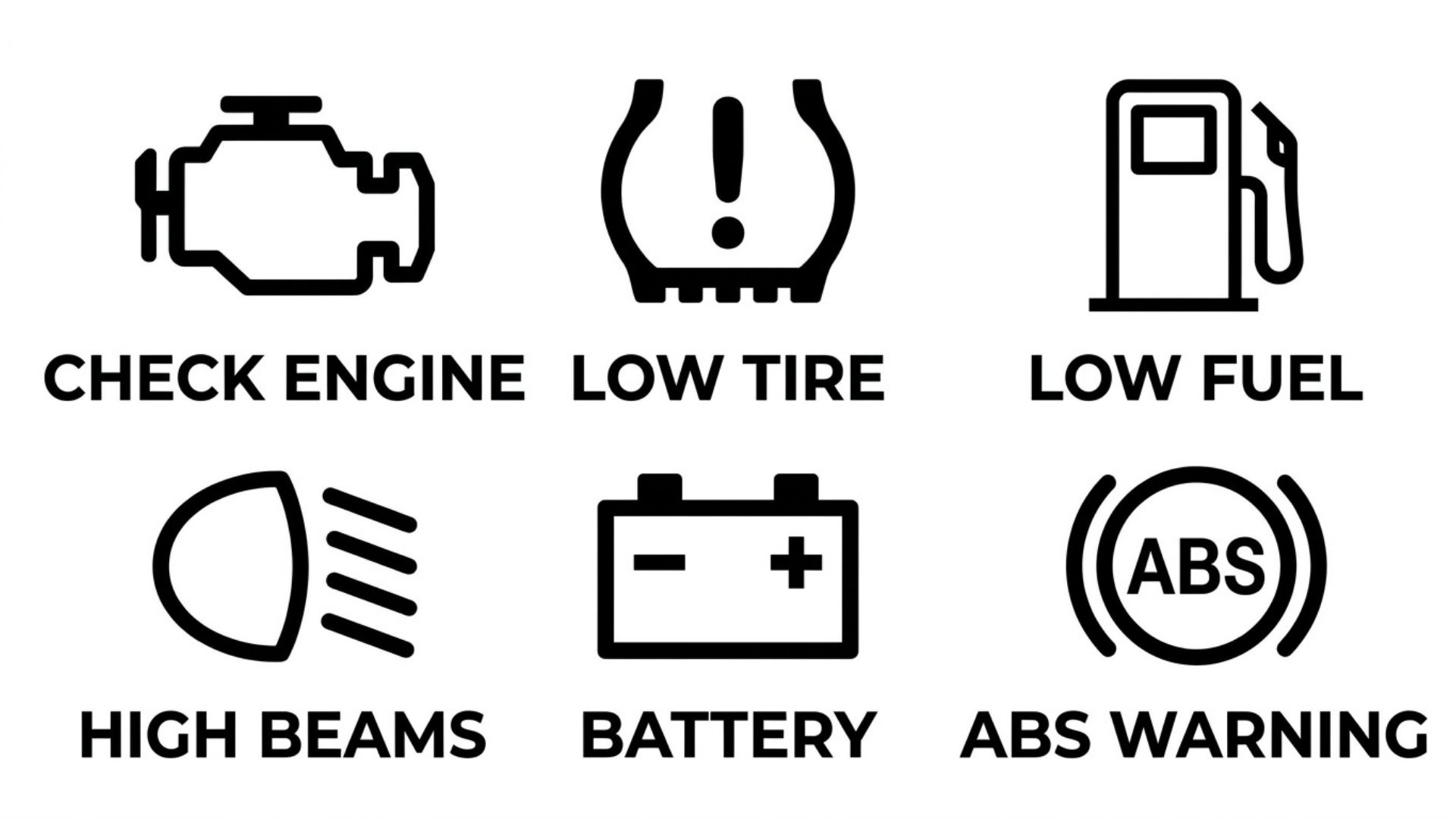
If a strange light suddenly appears on your Nissan Rogue dashboard, your first question is probably simple: What does this symbol mean, and do I need to stop driving?
Some dashboard lights are normal indicators that tell you a feature is active, while others can signal a problem with the brakes, engine, tires, charging system, airbags, steering, or driver-assistance technology.
This guide explains common Nissan Rogue dashboard symbols and meanings in straightforward language. It also explains the difference between warning lights and normal indicators, what the colors generally mean, how serious different warnings may be, and what to do when several lights appear together.
One important point is that dashboard symbols can vary according to the Rogue’s model year, trim, drivetrain, and available equipment. A symbol found on one Rogue may not appear on another. Always use the owner’s manual for your specific vehicle when you need a final diagnosis or safety instruction.
Nissan Rogue Dashboard Symbols at a Glance
The following table gives you a quick way to identify some of the most common Nissan Rogue warning and indicator symbols.
| Symbol or Indicator | Name | General Meaning | What to Do |
| BRAKE / brake symbol | Brake Warning | Parking brake or brake-system warning | Check promptly; stop if braking is affected |
| ABS | ABS Warning | Possible anti-lock braking system problem | Have the system inspected |
| Engine-shaped symbol | Check Engine / MIL | Vehicle has detected a fault | Diagnose the vehicle |
| Battery symbol | Charge Warning | Possible charging-system problem | Have the system checked |
| Oil-can symbol | Oil Pressure Warning | Possible low engine oil pressure | Stop safely and follow manual instructions |
| Tire with ! | Low Tire Pressure / TPMS | One or more tires may have low pressure | Check tire pressures |
| Airbag symbol | Air Bag Warning | Possible supplemental restraint-system problem | Have it inspected |
| Steering wheel symbol | Power Steering Warning | Possible power-steering problem | Exercise caution and seek service |
| Vehicle with skid marks | Slip Indicator | Traction/stability control activity or warning | Check the vehicle information display if it remains on |
| VDC OFF | Vehicle Dynamic Control Off | VDC has been switched off | Check whether this was intentional |
| AWD LOCK | AWD Lock Indicator | AWD lock function is selected, if equipped | Usually informational |
| High-beam symbol | High Beam Indicator | High beams are on | Informational |
| Turn arrows | Turn Signal | Turn signal is active | Normal indicator |
| AEB-related symbol | Automatic Emergency Braking Warning | AEB system may require attention | Check the system/message |
| RAB-related symbol | Rear Automatic Braking Warning | RAB system may require attention | Check the system/message |
This is a general reference, not a substitute for the manual. Nissan’s Rogue manuals contain model-specific warning and indicator information, and some systems are listed only for vehicles “if so equipped.”
What Do the Colors of Nissan Rogue Dashboard Lights Mean?
Dashboard-light color can provide a useful first clue, but you should always identify the actual symbol before deciding how serious it is.
Red Warning Lights
Red lights generally deserve immediate attention. They can relate to important systems such as brakes, oil pressure, charging, or other vehicle functions.
A red warning does not automatically mean that the vehicle must be towed, but it does mean you should not casually ignore it.
If the vehicle also has unusual braking, steering, engine, or temperature behavior, find a safe place to stop and consult the owner’s manual.
Yellow and Amber Warning Lights
Yellow or amber lights commonly indicate that a system has detected a condition that requires attention, inspection, or correction.
Examples include:
- Check engine
- ABS
- Low tire pressure
- Airbag
- Power steering
- Driver-assistance warnings
The appropriate response depends on the particular symbol.
Green and Blue Indicator Lights
Green and blue lights are often informational. They may tell you that a feature is active.
Examples include:
- Turn signals
- High beams
- Certain lighting functions
- Some driver-assistance indicators
- Cruise-control indicators
These lights do not necessarily indicate a mechanical problem.
Why Color Alone Is Not Enough
It is tempting to use a simple rule such as “red is bad and green is good,” but dashboard systems are more complicated than that.
A yellow warning may still require immediate attention, while a red indicator may sometimes simply identify a system state. Always consider the symbol, accompanying message, and vehicle behavior together.
Nissan Rogue Red Warning Lights
Red warning lights deserve particular attention because they can involve systems that affect safe vehicle operation.
Brake Warning Light
The brake warning symbol can be associated with the parking brake or a brake-system condition. Depending on the Rogue model and circumstances, the warning may also relate to brake fluid or another braking-system issue.
If the warning appears because the parking brake is engaged, releasing the parking brake may make the light disappear.
However, if the warning remains on after the parking brake is released, the situation deserves further attention.
Pay particular attention if you notice:
- A soft or unusual brake pedal
- Reduced braking performance
- Longer stopping distances
- Unusual brake noises
- Another brake-related warning
- A warning that remains illuminated while driving
If the vehicle does not feel safe to stop or control, do not continue driving simply because the engine is still running.
Oil Pressure Warning Light
The oil-can symbol is generally associated with engine oil pressure, not simply a routine oil-change reminder.
This distinction is important.
An oil-pressure warning can indicate a potentially serious engine condition. If it illuminates while the engine is running, safely stop and follow the instructions in your Rogue owner’s manual.
Do not assume that adding oil is always the complete solution. Low oil level is only one possible cause of an oil-pressure warning.
If the warning remains illuminated, professional diagnosis may be necessary.
Battery or Charge Warning Light
The battery-shaped dashboard symbol is commonly a charging-system warning.
It does not necessarily mean that the battery itself is simply “low.”
The vehicle’s charging system includes components that maintain electrical power while the engine is running. A problem with this system can eventually cause the vehicle to lose electrical power.
If the charge warning stays on after the engine starts, have the charging system checked promptly.
Possible causes can include a problem with the charging system, alternator, electrical connections, or another related component.
Seat Belt Warning Light
The seat belt warning light reminds occupants to fasten their seat belts.
Depending on the vehicle, an audible chime may accompany the visual warning.
This is generally an expected safety reminder rather than a mechanical fault. If the warning remains on when the relevant seat belts are properly fastened, check the vehicle information display and owner’s manual for your model.
Nissan Rogue Yellow and Amber Warning Lights
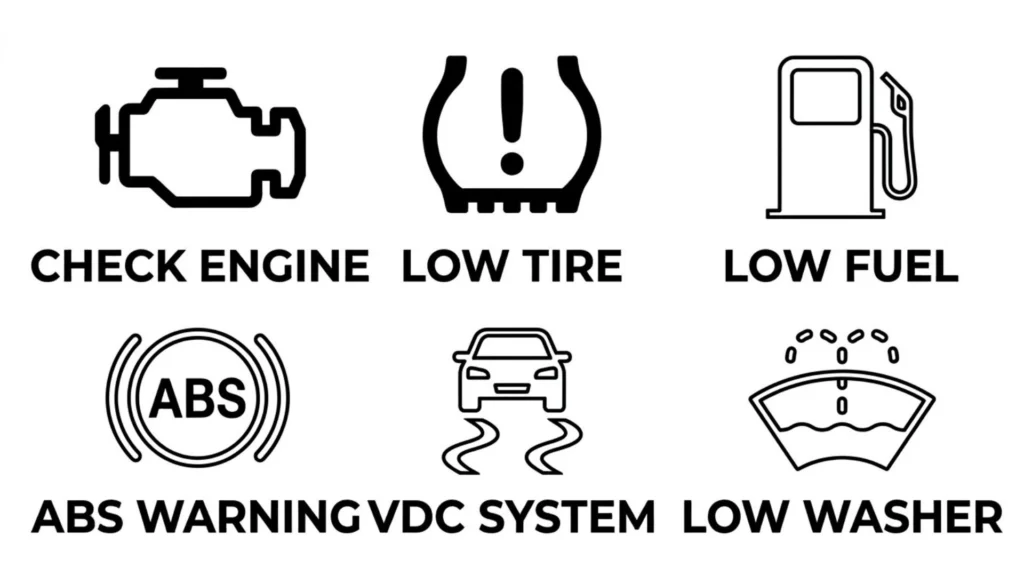
Amber warnings often mean that a system needs attention, but the urgency depends on the specific warning.
Check Engine Light
The engine-shaped symbol is commonly called the check engine light or Malfunction Indicator Light (MIL).
It means the vehicle’s diagnostic system has detected a condition that requires investigation.
The symbol does not identify one specific failed part.
Possible causes can involve:
- Engine-management systems
- Emissions-related components
- Sensors
- Ignition-related issues
- Fuel-system conditions
- Other electronically monitored systems
A loose or missing fuel-filler cap can also cause a malfunction indicator in some circumstances.
What If the Check Engine Light Is Solid?
A steady check engine light generally means the vehicle has detected a fault that should be diagnosed.
If the Rogue is operating normally, you may be able to arrange service rather than immediately stopping, depending on the circumstances.
However, the warning should not be ignored for an extended period.
What If the Check Engine Light Is Flashing?
A flashing check engine light deserves greater urgency.
If the light is flashing, particularly when accompanied by rough running, shaking, loss of power, or unusual engine behavior, reduce the risk of continued driving and follow the manufacturer’s guidance.
Do not assume that a flashing light is equivalent to a steady light.
ABS Warning Light
ABS stands for Anti-lock Braking System.
The ABS system is designed to help prevent wheel lock during certain braking situations.
If the ABS warning remains illuminated, the vehicle has detected a possible problem with the anti-lock braking system.
This does not necessarily mean that all braking has disappeared. However, the ABS function may not operate as intended.
Have the system checked, especially if the ABS warning appears with another brake warning or if braking feels unusual.
Low Tire Pressure Warning Light
The tire-shaped symbol containing an exclamation point is associated with the Tire Pressure Monitoring System (TPMS).
It generally indicates that one or more tires may have pressure below the recommended level.
When this warning appears:
- Check all applicable tire pressures.
- Use the recommended pressure for your Rogue.
- Look for visible tire damage.
- Inflate the tires to the manufacturer’s recommended pressure.
- Check whether the warning clears according to the vehicle’s procedure.
Do not use the maximum pressure printed on the tire sidewall as a substitute for the vehicle’s recommended tire pressure.
Cold weather can also affect tire pressure, so a warning may appear when temperatures change significantly.
Air Bag Warning Light
The airbag-shaped warning symbol relates to the Supplemental Restraint System (SRS).
The system can include airbags and other restraint components.
If the airbag warning remains illuminated when it should not, have the system inspected.
This is an important safety warning because you cannot determine from the dashboard symbol alone whether every restraint component will function correctly in a collision.
Power Steering Warning Light
A steering-wheel warning can indicate a problem involving the power-steering system.
If power assistance is reduced, the steering wheel may feel heavier than normal.
Pay attention to any sudden change in steering effort.
If steering becomes difficult or unusual, slow down safely and determine whether the vehicle can be moved without creating a safety risk.
Nissan Rogue Traction and Stability Symbols
Rogue models can use several indicators related to traction and stability.
Slip Indicator
The vehicle-with-skid-marks symbol is commonly associated with the Slip Indicator.
It can illuminate when the vehicle’s traction or stability-control system is actively responding to wheel slip.
For example, the indicator may appear during conditions where the tires are losing traction.
A brief appearance during active system operation does not necessarily mean that something has failed.
However, if the light stays on or appears with another warning, consult the vehicle information display and owner’s manual.
VDC OFF
VDC stands for Vehicle Dynamic Control.
The VDC OFF indicator tells you that the Vehicle Dynamic Control system has been switched off.
Nissan generally recommends leaving the system on during normal driving. There can be situations, such as attempting to free a vehicle from snow or mud, where temporary deactivation may be useful.
If you see VDC OFF unexpectedly, check whether the button or control was accidentally activated.
AWD LOCK
Some Nissan Rogue models equipped with an applicable all-wheel-drive system have an AWD LOCK function.
The AWD LOCK indicator tells you that the lock function has been selected.
This is primarily an operating indicator rather than a warning that something has necessarily failed.
Because AWD operation differs by model year and drivetrain, use the instructions for your particular Rogue.
Nissan Rogue Driver-Assist Warning Symbols
Newer Rogue models can have numerous electronic driver-assistance systems. This means you may see dashboard warnings that are unfamiliar if you previously owned an older vehicle.
Automatic Emergency Braking Warning
Automatic Emergency Braking (AEB) is designed to assist in certain situations where the vehicle detects a potential forward collision.
A warning involving this system can mean that the system has detected a problem, is unavailable, or is affected by certain operating conditions.
Do not assume that an AEB warning means the vehicle’s regular brakes have failed.
Instead, read the accompanying message and consult the owner’s manual.
Rear Automatic Braking Warning
Some Rogue models are equipped with Rear Automatic Braking (RAB).
This system is designed to assist when reversing under applicable conditions.
A RAB warning can indicate that the system is unavailable or requires attention.
The exact behavior depends on the vehicle’s equipment and model year.
High Beam Assist Indicator
Some Rogue models have High Beam Assist.
This feature can automatically manage high-beam operation under suitable conditions.
An indicator associated with this feature may simply tell you that the system is active.
If the indicator is accompanied by a warning message, follow the instructions shown by the vehicle.
Master Warning Light
A master warning symbol is designed to draw your attention to another condition detected by the vehicle.
When it appears, look at the vehicle information display for an accompanying message.
Do not try to diagnose the problem from the master warning symbol alone.
The message displayed alongside it may provide the information you actually need.
Nissan Rogue Dashboard Indicators That Are Usually Normal
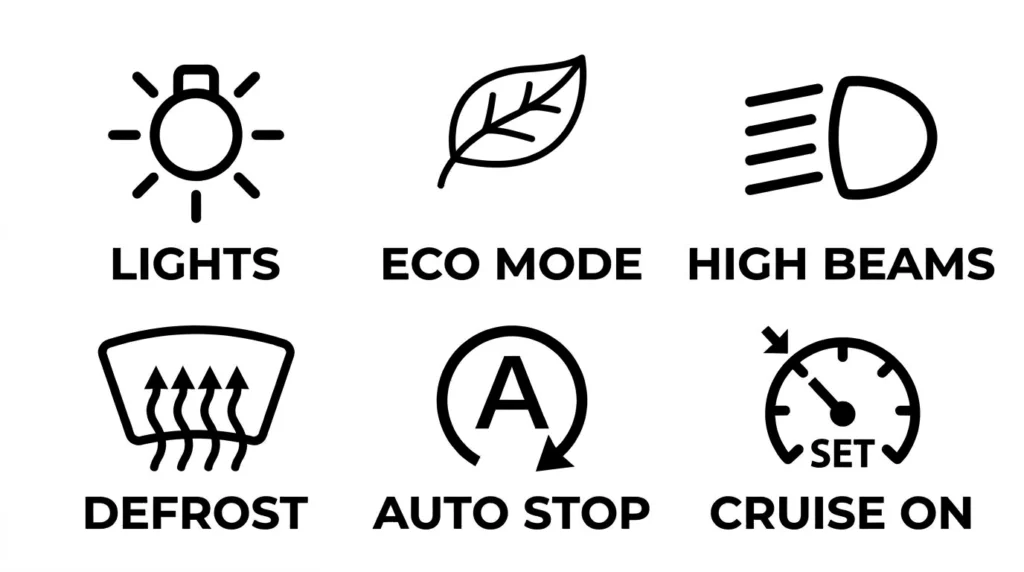
Not every dashboard light means there is a problem.
Some indicators simply show that you have activated a particular function.
Turn Signal Indicators
The left and right arrows flash when the corresponding turn signal is operating.
Both may flash when the hazard warning lights are activated.
These are normal indicators.
High Beam Indicator
The blue high-beam symbol tells you that the high-beam headlights are active.
If you see it when you did not intend to use high beams, switch them off when appropriate for surrounding traffic.
Fog Light Indicator
If your Rogue is equipped with fog lights, an indicator can tell you when they are operating.
The availability and exact symbol can vary by model and equipment.
Cruise Control Indicator
Depending on the Rogue’s equipment, the dashboard or vehicle information display may show indicators associated with cruise-control operation.
These indicators generally tell you about the operating state of the system rather than indicating a mechanical failure.
What Should You Do When a Nissan Rogue Warning Light Appears?
The correct response depends on the symbol, but a simple process can help you decide what to do.
When You Should Consider Stopping
Take a warning particularly seriously when it involves:
- Brake operation
- Engine oil pressure
- Overheating
- Major steering problems
- Charging-system problems accompanied by vehicle symptoms
- A flashing check engine light
- Another warning combined with unusual vehicle behavior
Find a safe location to stop whenever continuing to drive could create a safety risk.
When You Can Arrange Service
Some warnings may allow you to drive carefully for a limited distance when the vehicle is operating normally.
Examples can include certain:
- Check engine warnings
- ABS warnings
- Tire-pressure warnings
- Driver-assistance warnings
However, “can continue temporarily” does not mean “safe to ignore.”
A warning that remains illuminated should be investigated.
What to Do When Several Lights Appear
Several dashboard lights appearing together can be alarming.
However, multiple warnings do not necessarily mean that several unrelated parts have failed simultaneously.
Modern vehicle systems communicate electronically, so one problem can sometimes cause several related systems to display warnings.
When multiple lights appear:
- Stay calm and maintain control of the vehicle.
- Look at the vehicle information display.
- Read any accompanying warning message.
- Identify whether any light is red or flashing.
- Pay attention to braking, steering, engine performance, and temperature.
- Stop safely if the vehicle behaves abnormally.
- Check the owner’s manual for the exact warning combination.
- Arrange professional diagnosis when necessary.
Do Nissan Rogue Dashboard Symbols Change by Model Year?
Yes. This is one of the most important things to remember when using an online dashboard guide.
Why Model Year Matters
Nissan has produced the Rogue across multiple generations, and the available dashboard systems have changed over time.
A newer Rogue may have driver-assistance indicators that an older Rogue does not have.
Likewise, older models may have dashboard symbols that are not displayed in exactly the same way on newer vehicles.
Therefore, searching for:
“Nissan Rogue dashboard symbols”
is useful for general identification, but searching for:
“2024 Nissan Rogue dashboard symbols”
or another exact model year can provide more relevant information.
Why Trim and Equipment Matter
Two Rogues from the same year may not necessarily have identical equipment.
Some systems depend on:
- Trim level
- Drivetrain
- Optional packages
- Safety technology
- Available driver-assistance features
For this reason, avoid assuming that every symbol shown in a generic online image belongs to every Rogue.
If a manual says a feature is available “if so equipped,” that means the vehicle must have the applicable equipment for that symbol or system.
How to Find the Correct Nissan Rogue Owner’s Manual
When a warning light is unfamiliar, the best source is the manual for your exact vehicle.
Start by identifying:
- Model year
- Rogue model
- Trim, if known
- Drivetrain
- Exact dashboard symbol
- Any accompanying message
Nissan’s official Manuals & Guides resource allows owners to select their vehicle and model year.
Your owner’s manual is particularly important when:
- A red warning remains on
- A warning is flashing
- Several warnings appear together
- The vehicle behaves differently
- You are unsure whether it is safe to continue driving
- The symbol appears to involve brakes, steering, airbags, oil pressure, or another critical system
An online article can help you identify a symbol, but it should not replace the manufacturer’s instructions for a safety-critical warning.
How to Tell What a Nissan Rogue Dashboard Symbol Looks Like
You do not need to know the technical name of a warning before searching for it.
Try describing its appearance.
For example:
Engine-Shaped Symbol
This is generally the check engine/Malfunction Indicator Light.
Tire-Shaped Symbol With an Exclamation Point
This generally refers to low tire pressure or TPMS.
Circle With ABS
This identifies the ABS warning.
Person With a Circle in Front
This relates to the airbag/SRS system.
Vehicle With Skid Marks
This is associated with the Slip Indicator or stability-control system.
Steering Wheel With a Warning Mark
This can indicate a power-steering warning.
Describing the appearance can make it easier to identify an unfamiliar dashboard light before you know its official name.
Nissan Rogue Dashboard Symbols and Warning Messages
A dashboard symbol and the vehicle information display often work together.
For example, a warning light may appear while a text message provides additional information.
This is why you should not look only at the symbol.
When a warning appears, check:
- The symbol
- The color
- Whether it is flashing or steady
- The accompanying text
- Other warning lights
- Changes in vehicle behavior
This combination provides much more information than any single symbol.
Common Mistakes to Avoid With Nissan Rogue Dashboard Lights
Ignoring a Warning Because the Vehicle Still Drives
A vehicle can continue moving even when an important system has a problem.
The fact that the engine is running does not automatically mean the vehicle is safe to drive normally.
Assuming Every Yellow Light Is Harmless
Amber often means attention is needed. It does not mean the warning can always be ignored.
Assuming Every Red Light Means the Same Thing
A red brake warning and another red indicator can have completely different meanings.
Always identify the actual symbol.
Using a Different Model Year’s Manual
This can lead to confusion because equipment and dashboard systems change.
Use the manual that matches your Rogue.
Replacing Parts Without Diagnosing the Problem
A warning light usually identifies a system or condition, not necessarily a specific failed component.
Proper diagnosis should come before replacing expensive parts.
Frequently Asked Questions About Nissan Rogue Dashboard Symbols
What does the red brake light mean on a Nissan Rogue?
It can indicate that the parking brake is engaged or that a brake-system condition requires attention, depending on the vehicle and circumstances. If the light remains on after releasing the parking brake, or if braking feels abnormal, follow the owner’s manual and have the system checked.
What does the check engine light mean on a Nissan Rogue?
The check engine light, or Malfunction Indicator Light, means the vehicle’s diagnostic system has detected a fault. It does not identify one specific failed part. A flashing light generally requires more urgent attention than a steady light.
Can I drive my Nissan Rogue with the ABS light on?
An illuminated ABS warning means the anti-lock braking system may have a problem. The vehicle may still have ordinary braking capability, but the ABS function may not work as intended. Have the system inspected and exercise additional caution until the issue is resolved.
What does the tire symbol with an exclamation mark mean?
It generally indicates that one or more tires have low pressure or that the tire-pressure monitoring system requires attention. Check the tire pressures using the recommended specifications for your Rogue and inspect the tires for visible problems.
What does VDC OFF mean on a Nissan Rogue?
VDC OFF means Vehicle Dynamic Control has been switched off. If you did not intentionally turn it off, check the controls and owner’s manual. Nissan generally recommends leaving VDC enabled during normal driving.
What does the slip light mean on a Nissan Rogue?
The Slip Indicator is associated with the vehicle’s traction and stability-control system. It may illuminate when the system is actively responding to wheel slip. If it remains on unexpectedly or appears with other warnings, consult the vehicle information display and owner’s manual.
Why are several warning lights on in my Nissan Rogue?
Several warnings can sometimes appear because one underlying problem affects multiple electronic systems. Read the vehicle information display and note which warning appeared first. If the vehicle has unusual braking, steering, engine, or temperature behavior, stop safely and seek appropriate assistance.
Do Nissan Rogue dashboard symbols change by year?
Yes. Dashboard symbols and available vehicle systems can differ between Rogue model years, trims, and equipment levels. Use the owner’s manual for your exact vehicle for the most reliable information.
What does the blue light mean on a Nissan Rogue?
A blue dashboard indicator is often associated with a lighting function, particularly the high-beam indicator. However, the exact meaning depends on the symbol, so identify the specific icon rather than relying on color alone.
Where can I find the correct Nissan Rogue dashboard symbols?
The owner’s manual for your exact Rogue is the best reference. Identify the model year and equipment before comparing an unfamiliar dashboard symbol with an online guide.
Conclusion
Understanding Nissan Rogue dashboard symbols and meanings can make an unexpected warning much less confusing. The most important step is to identify the actual symbol rather than assuming every dashboard light means a serious mechanical failure. Some indicators simply show that a feature is active, while others can warn about brakes, oil pressure, tires, the engine, charging system, airbags, steering, traction control, or driver-assistance technology.
Remember that the model year, trim, drivetrain, and available equipment matter. If a warning is red, flashing, remains illuminated, or appears alongside unusual vehicle behavior, take it seriously and consult the correct owner’s manual. A dashboard guide can help you understand the symbol, but the manufacturer’s instructions for your specific Rogue should guide any safety-critical decision.

Adam Sullivan is a dedicated writer who enjoys transforming everyday topics into engaging and informative content. His writing focuses on making complex ideas simple, practical and enjoyable for readers of all backgrounds. Adam is also the fictional author of The Lantern Beyond Autumn Hills and Where the Morning Horizon Waits. Outside of writing, he enjoys photography, traveling and discovering inspiration through new experiences. He believes great content should be both helpful and easy to connect with.
 Dylan Anderson